
Thank you for your continued support of OHDr.
As health insurance certificates in Japan have now been integrated with the My Number Card, the method for confirming your health insurance number has changed.
Please follow the steps below to upload the required identification image.
Important: Uploading an image of the My Number Card alone does not allow us to confirm your health insurance number. Please make sure to follow the steps carefully.
Step ①Log in to My Number Portal (マイナポータル)
If you are unsure how to log in, please refer to the official guidance provided by the Digital Agency:デジタル庁:マイナポータルログイン方法
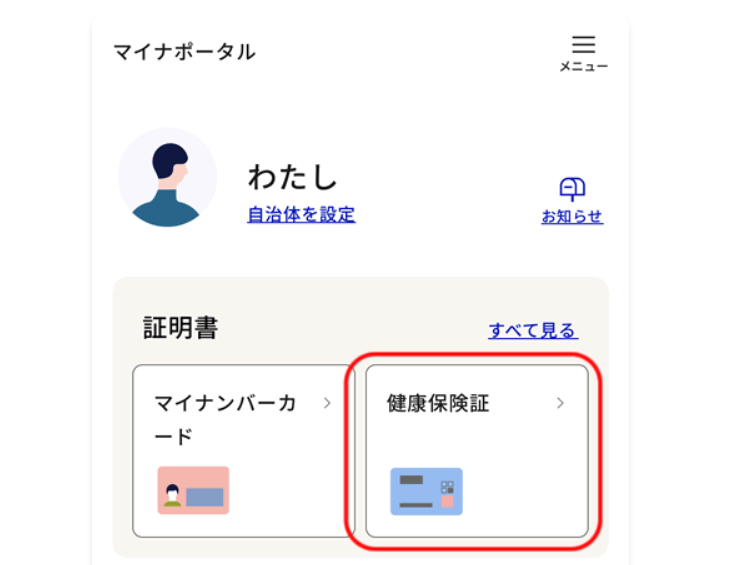
Step ②From the menu, select “Health Insurance Certificate” (健康保険証)
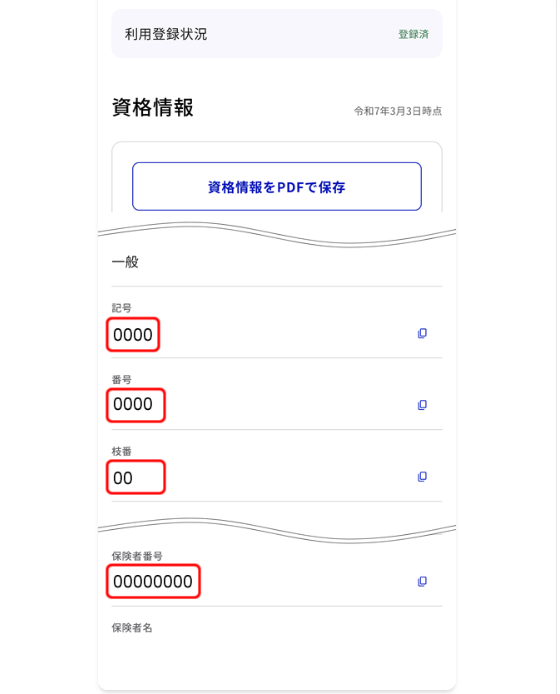
Step ③Check your Health Insurance Eligibility Information (資格情報)
Please take a screenshot of the eligibility information screen and upload the image to your OHDr. account.
If you have any questions or encounter any difficulties, please do not hesitate to contact our customer support team. Thank you for your continued support of OHDr.

